
Getting Your Vanity URL on LinkedIn
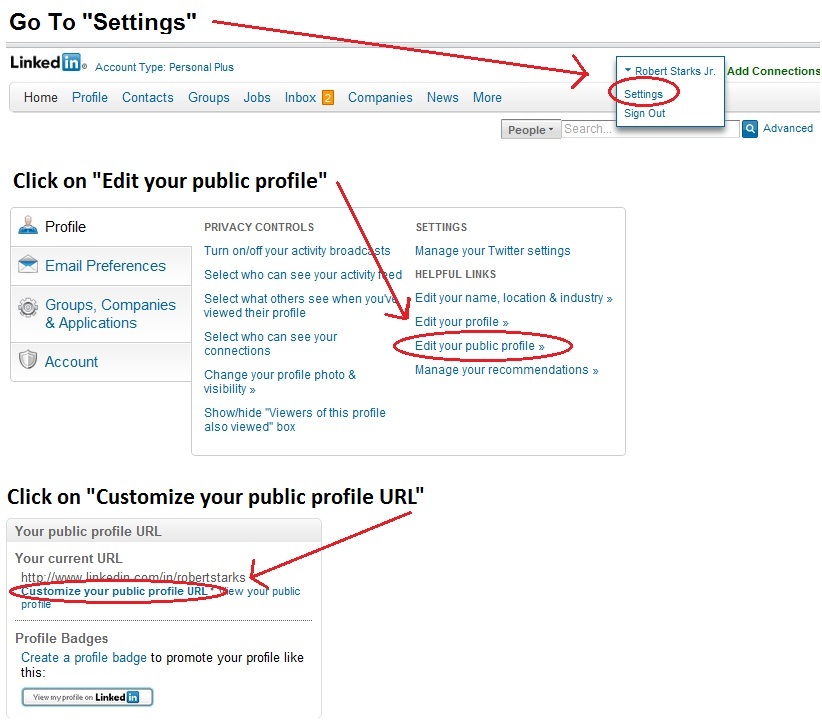
A vanity URL is a domain name that points to something to which it is related and indicated in the name of the URL. For example, http://www.linkedin.com/in/robertstarks is the URL of my personal LinkedIn profile. If you have a LinkedIn account and don’t know if you have a vanity URL, you can view your profile and check the URL displayed next to “public profile.” If you haven’t claimed your LinkedIn vanity URL, you’ll likely see a string of random numbers and/or letters making it very difficult to remember and not something you would want to put on your resume or business card. To get a vanity URL, simply log in to your LinkedIn account. Once signed in, in the upper right corner, hover the mouse over your name and you’ll get a drop down menu with two options including “settings,” and “sign out.” Click on “settings,” and you’ll be taken to your account settings page. Click on “Edit your public profile.” Finally, click on “Customize your public profile URL.” You can then create your vanity URL by simply typing the name you want and saving. It’s that easy.
You may also want to read:
- HOW TO: Properly Name Your Resume
- HOW TO: Get Your Own Personal Infographic Webpage
- 10 Ways to Find a Job on Facebook
- HOW TO: Get a Vanity URL for Your Google Plus Profile
- How and When to Discuss Salary During the Interview Process
This image shows you the steps outlined for those new to LinkedIn or who prefer a visual.






Hi Robert! Any suggestions for creating a standout vanity URL when your firstnamelastname is already taken?
I’m looking to change careers so I wasn’t sure if I should add a word like ‘creative’ to make it ‘CreativeChristine’, for example.
Thanks!
Christine
Christine,
Identifying a name you want to use to differentiate yourself from others who may also have your name is among the first steps in personal branding. I don’t recommend using an adjective but rather, using other identifying information such as a middle initial. Use a site like http://www.namechk.com or http://www.knowem.com to experiment with different name options to see what is taken. Once you identify something that hasn’t been taken, claim it – not just in your LinkedIn URL, but others as well to establish a strong, consistent, online presence. I hope that helps you.